Best Office Printers 2026: Pick the Right One Fast
05 August 2026


EST . 2011
Do you need help? Give us a call on 0861 333 234

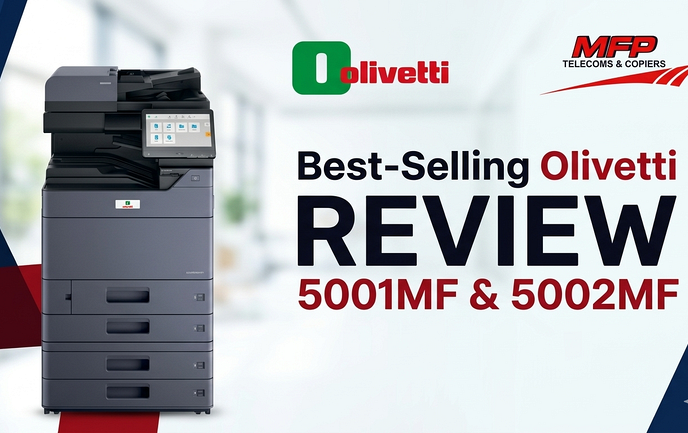
Choosing the best office printer for your business in 2026 is essential to keep pace with evolving demands and technology advancements.
Among the leading options, the Olivetti 5001 MF and Olivetti 5002 MF stand out as top picks for office environments across South Africa.
These models, brought to you by the trusted partnership between MFP Group and Olivetti, offer powerful solutions that address modern office challenges such as high-volume printing, multifunction capabilities, and efficiency.
The need for reliable, fast, and versatile printers has never been greater as businesses strive to enhance productivity, streamline workflows and reduce costs at the same time.
Gone are the days that you have to struggle with a printer...
Key factors shaping office printing needs today include:
With constant technological innovations, selecting the right office printer in South Africa means investing in equipment that not only meets current requirements but adapts to future business growth. The Olivetti 5001 MF and 5002 MF exemplify this balance by delivering robust performance paired with smart features tailored to busy offices.
Whether you’re upgrading from older Olivetti or Kyocera models or exploring new solutions, understanding these advancements will help you make informed decisions that improve your office productivity from day one.
Selecting the right office printer is crucial for maintaining smooth workflow and enhancing office printer efficiency. A reliable copier for business operations ensures that documents are produced quickly and without interruption, directly impacting productivity. When your printer keeps up with demand, employees spend less time waiting and more time focusing on their core tasks.
Unreliable or slow printers disrupt daily business operations in several ways:
Investing in a multi-functional printer (MFP) offers significant benefits beyond just printing. These devices combine printing, scanning, copying, and sometimes faxing into one seamless unit, reducing the need for multiple machines. Key advantages of MFPs include:
Choosing an MFP aligns with modern office demands where versatility and speed are paramount. The right office printer acts as a cornerstone of office automation, helping businesses stay competitive by streamlining document management and improving overall efficiency.
A multi-functional printer (MFP) is a versatile office device that combines printing, scanning, copying, and sometimes faxing into one machine. This all-in-one capability makes MFPs an essential tool for businesses looking to streamline their document handling processes without cluttering their workspace with multiple devices.
Benefits of Multi-Functional Printers for Businesses:
For businesses aiming to enhance productivity while controlling operational costs, selecting the right multi-functional printer (MFP) is critical. These devices offer flexibility to manage diverse office tasks efficiently—making them a top choice among the Best Office Printer options available in 2026.
A3 printers are an essential choice for large offices that need flexible printing options beyond the standard A4 size. These printers are designed to handle larger formats, making them perfect for printing big documents like posters, architectural plans, spreadsheets, and marketing materials without sacrificing quality or speed.
When looking for the best office printer options for your business, it's important to consider multi-functional printer (MFP) copiers and A3 printers. These devices offer flexibility in output size while supporting high-volume printing demands — critical factors that contribute directly to smoother office operations and increased productivity.
High-volume printers are essential for busy office environments where printing demands are consistently heavy and deadlines are tight. When selecting a high-volume printer, especially a multi-functional printer (MFP) or copier, focus on features that ensure reliability, speed, and efficiency without compromising quality.
Key features to look for in high-volume printers:
High-volume printers designed as A3 multi-functional copiers offer versatility in handling various document sizes while meeting large workload requirements. These devices excel in environments like corporate offices, schools, and factories where printing demands are both heavy and varied.
The combination of speed, capacity, multifunctionality, and optional finishing features makes these printers indispensable tools that significantly enhance productivity in demanding office settings.
MFP Group South Africa stands out as a premier office automation company, actively serving the South African market since 2011. Their expertise and dedication have made them a trusted name for businesses looking to enhance their printing capabilities with reliable and efficient solutions.
Choosing Olivetti through MFP Group means you invest in industry-leading devices backed by a company that understands local business environments deeply. Their focus remains on delivering the best office printer options that improve workflow and productivity every day.
The Olivetti 5001 MF and 5002 MF are powerful A3 multi-functional printers designed specifically for busy offices. They combine multiple functions into one reliable device, offering significant advantages for business productivity.
These models deliver exceptionally fast printing speeds, enabling your office to complete large print jobs quickly.
Combines printing, scanning, and copying in a single device, eliminating the need for separate machines.
Equipped with four additional paper trays, these printers support diverse media types and sizes simultaneously.
Staple finishers and booklet finishers are available as optional add-ons.
The combination of speed, volume capacity, multifunction integration, and flexible handling makes the Olivetti 5001 MF and 5002 MF exceptional choices for businesses aiming to boost efficiency through smart printing solutions.
Choosing an office printer with a low cost per page is critical for businesses looking to manage expenses effectively. Olivetti printers stand out as some of the most economical office printers in South Africa, delivering significant savings over time. The cost-efficiency stems from high-yield consumables and optimized toner usage, which reduce frequent replacements and minimize waste.
Olivetti’s multifunctional capabilities go beyond just economics. Features designed to save time and streamline processes include:
Businesses using Olivetti 5001 MF and 5002 MF printers report performance that exceeds expectations under heavy workloads. Offices processing up to 40,000 pages per month benefit not only from cost savings but also from uninterrupted productivity.
“Our office workflow improved drastically after switching to Olivetti. Printing speed combined with low operational costs made a noticeable difference in our daily operations.” — Office Manager, Johannesburg
“The multi-tray setup allowed us to handle different projects without swapping paper constantly. It’s been a real game-changer.” — IT Coordinator, Cape Town
Such testimonials highlight how these printers deliver on both economic and operational fronts, making them a smart investment for demanding business environments.
To keep your printing operations running smoothly, you need expert support that is both easy to access and trustworthy. The MFP Group has set up a strong network to provide printer support South Africa businesses can rely on. Here's what their infrastructure looks like:
This extensive coverage means you won't have to deal with long downtimes because of printer problems. The MFP Group’s technicians are specifically trained to service Olivetti printers, which means they have a deep understanding of the product and can resolve issues quickly.
Recognition plays a key role in validating service excellence. The MFP Group consistently earns top dealer awards and service excellence accolades. These honors highlight their commitment to quality support and trustworthiness, vital when choosing the Best Office Printer backed by dependable after-sales care.
Having a reliable partner like MFP Group makes it easier to manage your office printer fleets. This ensures that your investment in Olivetti printers leads to continuous productivity without any unexpected interruptions.
Choosing an office printer in South Africa requires a clear understanding of your business’s specific needs and operational demands. This ensures you invest in a device that not only meets current requirements but also supports future growth and efficiency.
Estimate your monthly print volume accurately. High-volume printers like the Olivetti 5001 MF and 5002 MF handle up to 40,000 pages per month without compromising speed or quality. If your business prints less frequently, smaller models may be sufficient, but scaling up with a robust machine avoids bottlenecks during peak periods.
Determine the paper size your office primarily uses. A4 printers suffice for standard documents, but if your work involves larger-format printing such as architectural plans, posters, or spreadsheets, an A3 multifunctional printer offers versatility. Olivetti’s A3 models provide flexibility, enabling large-scale output without sacrificing compactness.
Assess which functions are essential beyond printing—scanning, copying, faxing. Multi-functional printers (MFPs) combine these features in one unit, reducing clutter and streamlining workflows. For example, Olivetti’s all-in-one devices eliminate the need for separate scanners or copiers, saving space and time.
Consider toner or ink expenses over time. Machines like the Olivetti 5001 MF excel with low cost per page metrics, delivering significant savings compared to cheaper alternatives that require frequent cartridge replacements.
Factor in servicing costs and ease of maintenance. Access to a reliable support network—such as MFP Group’s nationwide technician coverage—minimizes downtime and keeps operations smooth. Warranty terms and availability of replacement parts also impact long-term cost efficiency.
Smaller offices might prioritize compactness and multifunctionality with moderate print volumes. Entry-level MFPs featuring easy connectivity satisfy typical document handling needs efficiently.
Offices with heavy workloads benefit from high-speed machines capable of continuous operation under load. Olivetti’s 5001 MF and 5002 MF come equipped with multiple paper trays and optional finishing units like staplers or booklet makers to automate repetitive tasks.
Understand how the printer fits into daily workflows. Features such as duplex printing, network compatibility, mobile device integration, and user authentication enhance security and productivity across teams.
Identifying these elements guides you in selecting a multifunctional copier that aligns perfectly with your operational profile while maximizing return on investment through enhanced productivity and cost control.
Connecting with MFP Group’s sales team is your first step to upgrading office printing with Olivetti’s advanced technology. You can request quotation Olivetti printer South Africa directly from experts who understand the local market and your specific business needs.
Getting a quote through MFP Group means tapping into years of experience supporting South African businesses. Their friendly approach makes technical details easy to understand, helping you make confident decisions about your next office printer investment.
Upgrading your office printer in South Africa means tapping into the combined advantage of cutting-edge technology and a strong local support network. The Olivetti 5001 MF and 5002 MF, offered by MFP Group, represent the best office printer solutions designed to meet high-volume demands while streamlining workflow.
Key reasons to upgrade now:
Act fast to transform your office environment. Upgrading your printer today means smarter work practices tomorrow. Don’t let outdated equipment hold back productivity or frustrate your team.
Ready to upgrade office printer South Africa businesses trust? Contact MFP Group’s knowledgeable sales team now. Experience how the best office printer technology paired with reliable local support can elevate your business efficiency in 2026.
Selecting the best office printer enhances workflow efficiency by providing reliable, fast, and multi-functional capabilities that meet evolving office printing needs. Investing in a quality printer reduces downtime caused by slow or unreliable devices, ultimately boosting overall business productivity.
MFPs combine printing, scanning, and copying into one device, saving space and reducing costs. The Olivetti 5001 MF and 5002 MF offer super-fast printing speeds, high-volume capacity up to 40,000 pages per month, flexible paper handling with multiple trays, and optional finishing features that streamline office workflows.
MFP Group has been a leading office automation company since 2011, offering Olivetti printers with over 7,000 installations annually across South Africa. They provide nationwide expert support through distribution centers and technicians in all major provinces ensuring smooth operation and trusted service quality.
Businesses should evaluate print volume requirements, device capabilities such as A3 vs A4 printing, multifunction features needed, total cost of ownership including consumables and maintenance costs, and match these with their business size and workflow demands to select the right multifunctional copier like those offered by Olivetti.
Olivetti printers offer low cost per page which leads to significant long-term savings. Their time-saving features improve office workflow productivity by reducing manual tasks. Many businesses have reported exceeding expectations in busy office environments due to these economical and efficient devices.
Upgrading provides access to cutting-edge technology combined with strong local support from MFP Group. This ensures enhanced efficiency, reliability, and smarter work practices tailored for modern business needs. Acting quickly allows businesses to stay competitive with high-performance yet economical printing solutions.