Best Value A3 Colour Copier South Africa (2026)
24 August 2026


EST . 2011
Do you need help? Give us a call on 0861 333 234

Best Value A3 Colour Copier South Africa (2026)
Choosing the best A3 colour copier for your business in South Africa is essential in 2026 to boost efficiency and uphold a professional image. Offices require reliable, affordable solutions capable of handling large print volumes without compromising quality.
Two leading brands dominate the market: Olivetti and Kyocera. They offer models designed for various office needs:
Balancing cost-effectiveness and performance is key. Fast printing with vibrant colours reduces wait times and enhances document presentation, directly impacting productivity. The right copier supports branding through sharp, consistent output while managing operational costs efficiently.
South African businesses must consider their unique needs when selecting office printers. An A3 colour copier offers advantages beyond standard printing:
MFPs combine printing, copying, scanning, and faxing into one machine, providing:
Fast machines producing crisp colours improve operations by:
Quality and speed are necessities in today’s competitive landscape. The right copier enables teams to deliver impressive results quickly.
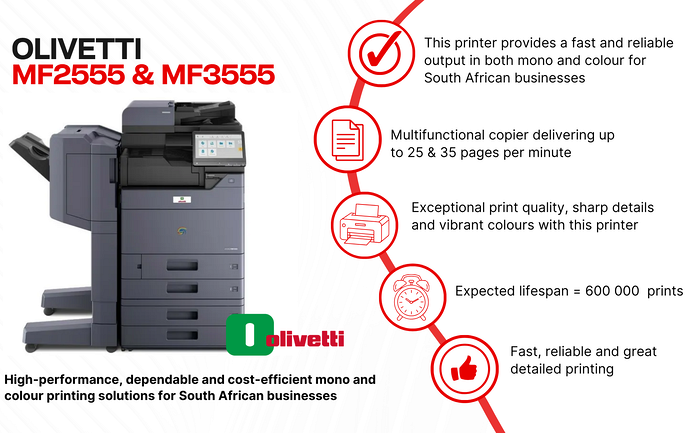
Olivetti’s MF series is prominent in 2026, particularly the MF2555 and MF3555, designed for demanding offices at reasonable costs.
| Feature | MF2555 | MF3555 |
|---|---|---|
| Speed | 25 pages per minute (ppm) | 35 ppm |
| Processor | Fast processor ensures minimal delay | Same fast processor |
| Print Quality | Consistent sharp colour output | Same high quality |
| User Interface | Responsive smartphone-like touchscreen | Same interface |
| Mobile Printing | Supported | Supported |
The higher speed of the MF3555 suits high-volume workloads better.
These models enhance processing speeds and connectivity options, offering additional pre-installed or downloadable apps to support evolving office workflows.
Kyocera offers comparable speeds (25 ppm & 35 ppm), known for robust durability and security features. Their interfaces are functional but less intuitive than Olivetti's touchscreen experience. Choice depends on preference for user experience, service availability, and office demands.
When choosing an A3 colour copier in South Africa consider:
Faster models reduce wait times during heavy workloads but may come at a higher price. Match speed to daily volume needs.
Support direct prints from smartphones or tablets without complex setups — ideal for flexible work environments.
Reduces time from job initiation to first print, maintaining smooth workflow even under heavy load.
With over 7,000 annual installations nationwide, Olivetti offers reliable copiers backed by extensive local support networks covering urban centres like Johannesburg, Cape Town, Durban, East London, and beyond. This ensures rapid installation and maintenance services wherever you operate—from Limpopo to Northern Cape.
Both brands offer reliability; however:
Cost differences exist but both deliver strong value depending on specific business priorities.
Since 2011, MFP Group has provided:
Partnering with MFP Group means access to a comprehensive service ecosystem tailored for South African businesses’ unique needs.
Ensuring efficient use of your copier involves both maintenance practices and maximizing feature use:
Personalize your device by adding/removing apps such as scan-to-email or cloud storage integration. Arrange frequently used functions on the home screen or create shortcuts for repetitive tasks like double-sided printing.
Enable employees to print directly from mobile devices hassle-free via Wi-Fi or NFC connections supporting various file types including PDFs, images, or Office documents—ideal for hot-desking or remote work scenarios.
Upgrading your office copier technology in South Africa means choosing a device that balances speed, reliability, ease of use—and cost-effectiveness. The Olivetti MF series alongside Kyocera’s MZ models represent top choices tailored to diverse business needs in 2026.
Engage with MFP Group today for expert advice on securing the best value A3 colour copier suited specifically to your requirements. Their nationwide coverage guarantees ongoing support that keeps your investment performing reliably day after day.
Ready to boost productivity? Contact MFP Group to transform your printing experience with smart solutions that empower smarter work.
Why should South African businesses choose an A3 colour copier for their office in 2026?
They improve productivity with cost-effective high-quality printing solutions that support professional branding through reliable speed and vibrant colour output.
What key features matter most when selecting an A3 colour copier?
Consider printer speed (25 vs 35 ppm), a responsive colour touchscreen interface resembling smartphones, direct mobile printing capabilities, and fast processors reducing print delays.
How do Olivetti's MF series compare with Kyocera's MZ series?
Olivetti offers widespread presence with over 7,000 units yearly backed by extensive local service; Kyocera emphasizes durability and security features. User experience preferences often guide choice between them.
What role does MFP Group play in supporting copier investments?
They provide installation and maintenance services across South Africa ensuring fast issue resolution which minimizes downtime while maximizing return on investment through expert support tailored to regional business needs.
What practical tips maximize copier productivity?
Regular device warm-up; prompt jam clearing; routine cleaning; proactive consumables management; customization using touchscreen apps; leveraging mobile printing capabilities—all ensure smooth operation aligned with modern workflows.